

What UAE buyers should understand first
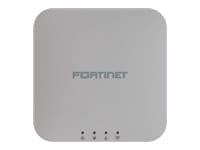
The FortiAP 221K is intended for indoor business wireless deployments that can benefit from Wi-Fi 7 features while continuing to operate on the widely used 2.4 GHz and 5 GHz bands. Its published radio layout is two client-serving radios plus Bluetooth Low Energy functionality, with internal antennas and a 2.5 Gigabit Ethernet uplink. That gives it a clear position: it is a compact, dual-band model rather than a tri-band access point built around additional 6 GHz capacity.
This distinction matters in the UAE because many wireless refresh projects involve a mixed estate of laptops, phones, scanners, payment terminals, printers, building devices and guest clients. Some of those devices may remain on 2.4 GHz for years, while newer client devices can use wider 5 GHz channels and newer Wi-Fi capabilities. The 221K may be a sensible candidate when the project values modern efficiency, a multi-gigabit uplink and central management, but it must still be validated against coverage, concurrency, interference, roaming and lifecycle requirements. A model name cannot replace a wireless design.
The environment this access point is designed to serve
The FortiAP 221K is best evaluated as part of an indoor wireless system rather than as an isolated ceiling device. A successful deployment begins with the physical space. Open-plan offices, partitioned clinics, classrooms, retail aisles, stock rooms and meeting areas can have very different signal behaviour even when the floor area is similar. Concrete walls, metal shelving, glass partitions, lift cores, decorative panels and high ceilings can all alter propagation. A quantity based only on square metres can therefore be misleading.
The user environment is equally important. A branch with thirty staff may have more than one hundred active or associated endpoints once phones, laptops, meeting-room systems, printers, handheld devices, sensors and visitor devices are counted. The published client limit is not the same as a recommended design density. Real capacity depends on airtime, signal quality, channel width, protocol mix, roaming, application behaviour and the amount of legacy traffic. A practical design aims to keep clients on usable channels with sufficient signal and airtime, not merely under a theoretical association ceiling.
Application patterns should also shape the decision. Email and browser traffic create a different load from video meetings, cloud desktops, large synchronisation jobs, voice over Wi-Fi, point-of-sale systems or warehouse scanning. Traffic that is delay-sensitive can expose weak roaming or congested airtime more quickly than bulk downloads. For this reason, the question “How many users can one access point support?” does not have a reliable answer without knowing what those users and their devices do.
The wired network beneath the access point must be ready. The 221K provides a multi-gigabit Ethernet uplink, so the connected switch port, cabling and upstream switching path should be reviewed if the design expects more than one gigabit of aggregate access-layer capacity. It can still connect through compatible lower-speed Ethernet where supported, but the wired link may then become the limiting factor. Category cabling condition, patching quality, switch negotiation, VLAN design and PoE budget all belong in the same review.
Finally, management affects the whole operational experience. Fortinet lists FortiGate integrated control and FortiEdge Cloud as management approaches for FortiAP access points. The chosen method should be checked for model support, software compatibility, entitlement, logging needs, administrator workflow and scale. A small office that already operates a compatible FortiGate may prefer integrated control, while a distributed environment may value cloud-oriented operations. The right choice depends on the existing architecture and the team responsible for day-to-day wireless administration.
Requirement canvas: information to define before selection
1. Floor layout and construction
Provide scaled floor plans where possible and identify concrete walls, glass rooms, shelving, kitchen areas, lifts, plant rooms, double-height spaces and any restricted mounting locations. Coverage estimates based on open-space range are not dependable inside a real building. The design should identify where users work, where roaming matters and where low-power or fixed devices are located.
2. Client and device mix
Count corporate laptops, smartphones, tablets, handheld terminals, printers, meeting-room equipment, sensors and guest devices. Record which clients support newer standards and which remain dependent on 2.4 GHz. A dual-band access point can be useful in mixed environments, but the expected proportion of legacy and high-throughput clients affects channel and capacity planning.
3. Concurrent activity
Separate total registered devices from simultaneously active devices. A quiet device associated to an SSID uses little airtime, while a smaller number of video or voice clients can create a demanding workload. State the busiest periods, meeting patterns, visitor peaks and any events that temporarily increase density in training rooms, retail zones or conference spaces.
4. Wireless applications
Identify voice, video, cloud applications, virtual desktops, printing, scanning, payment traffic, guest browsing and IoT functions. The design should distinguish business-critical traffic from convenience access. Quality-of-service settings may help, but they cannot create airtime or signal quality that the RF plan does not provide.
5. Existing switch and PoE estate
The 221K requires 802.3at Power over Ethernet and has a published maximum consumption of 16.3 W. Confirm that every planned switch port supports the required standard and that the total switch power budget can support all access points plus other powered devices. Also review port speed, uplink capacity, redundancy and switch lifecycle.
6. Management architecture
Confirm whether the access points will be controlled by a compatible FortiGate or through an eligible FortiEdge Cloud arrangement. The answer influences firmware planning, administrator access, logging, feature availability and commercial scope. Current compatibility documentation should be checked before quotation and again before implementation.
7. Security and segmentation
Define corporate, guest, voice, device and operational network zones. Decide how users authenticate, which systems provide identity, whether traffic is bridged locally or tunneled, and how internet access is controlled. Wireless segmentation is an architecture decision involving the controller, switches, firewall policies, DHCP, DNS and sometimes external identity services.
8. Growth and replacement horizon
State whether the project is a like-for-like replacement, a new site, a phased rollout or an expansion. Include expected headcount, additional floors, branch openings, new device categories and bandwidth changes. A design that works at commissioning may become constrained if future density, switch capacity or management scale was omitted from the original requirement.
Verified FortiAP 221K hardware evidence
The following values reflect the model-specific information published in Fortinet’s current wireless product material. They describe hardware capability and supported operating modes; they do not guarantee application throughput, coverage radius or a particular number of productive users in a live site.
| Evaluation field | FortiAP 221K detail | Buyer interpretation |
|---|---|---|
| Product type | Indoor Wi-Fi 7 access point | Designed for indoor ceiling or wall deployment, not as an outdoor-rated access point. |
| Client radios | Two radios plus BLE functionality | One 2.4 GHz radio and one 5 GHz radio serve clients; this is not a tri-band 6 GHz model. |
| 2.4 GHz capability | 2×2, 20/40 MHz; up to 688 Mbps published maximum data rate | Useful for compatibility and coverage, but channel reuse and interference remain important in dense sites. |
| 5 GHz capability | 2×2, 20/40/80/160 MHz; up to 2.882 Gbps published maximum data rate | Wider channels can raise link rates where spectrum permits, but narrower channels may provide better reuse in multi-AP designs. |
| Antennas | Two internal antennas plus an internal BLE antenna | A clean indoor installation with no external antenna selection, but placement still controls coverage. |
| IoT radios | Bluetooth Low Energy and Zigbee support | Potentially useful for supported location or IoT use cases; the application, software and integration must be validated separately. |
| Network interface | One 2.5/1 Gigabit Ethernet RJ45 interface | A multigigabit switch port can avoid a one-gigabit wired ceiling where aggregate wireless traffic is high. |
| Serial interface | One RS-232 RJ45 serial port | Used for service or deployment purposes rather than ordinary client data connectivity. |
| Power | 802.3at PoE; 16.3 W maximum published consumption | Check the power standard on each port and the aggregate PoE budget across the switch. |
| SSID capacity | Up to eight simultaneous SSIDs per client-serving radio | Avoid creating unnecessary SSIDs because each additional broadcast domain adds management and airtime overhead. |
| SSID modes | Local bridge, tunnel and mesh | The correct mode depends on topology, controller design, policy enforcement and backhaul needs. |
| Published client capacity | Up to 128 clients per radio | This is an association limit, not a recommended density for high-performance application use. |
The most important interpretation is the gap between link-rate capability and user experience. Wireless data rates are shared, affected by protocol overhead and sensitive to signal conditions. A client located near the access point with a clean channel and modern radio can behave very differently from a client behind several walls or one competing with older devices. The specification table is therefore a boundary for design, not a substitute for design.
How the 221K fits into a secure LAN architecture
A FortiAP deployment normally sits at the intersection of radio design, switching, segmentation, security policy and operations. The access point converts wired network services into wireless access, but the wider system determines how devices receive addresses, reach applications, access the internet and move between zones. Treating the AP as a standalone radio can leave critical dependencies unresolved.
FortiGate-managed wireless
Fortinet provides wireless-controller functionality within FortiGate platforms. In a compatible design, the FortiGate can manage FortiAP configuration and connect wireless policy to broader security controls. This can simplify administration for organisations already using FortiGate, but the controller capacity, FortiOS release, AP firmware, topology and traffic-forwarding method must be checked. A firewall that can technically discover an access point is not automatically the correct controller for the total AP count, tunnel load, logging requirement and business growth.
FortiEdge Cloud management
A cloud-managed approach can be relevant where access points are distributed across sites or where administrators need a hosted management workflow. The commercial entitlement, supported functions, device registration, internet reachability, log retention and operational responsibilities should be defined before purchase. Cloud management changes the control model; it does not remove the need for local switching, VLAN, internet, DNS, DHCP and security-policy design.
Switching and FortiLink context
When FortiSwitch is used, the wired and wireless edge can be designed with coordinated VLANs, access policies and PoE. However, FortiSwitch is not mandatory merely because the access point is Fortinet. Existing third-party switching may remain suitable if it provides the required VLANs, PoE standard, port speed and operational controls. The practical decision is whether the switch estate can deliver the physical and logical services the AP deployment needs.
Identity, guest access and network zones
Corporate wireless often relies on directory services, certificates, RADIUS or other identity systems. Guest access may use a separate portal or controlled internet-only network. Operational and IoT devices may need restricted access to specific systems. Each of these uses should be expressed as a policy and mapped to VLANs, firewall rules, DNS, DHCP and logging. The 221K can carry multiple SSIDs, but creating one SSID for every department is rarely an efficient design. Fewer, well-designed networks with identity-aware controls are usually easier to operate.
Logging and troubleshooting
Wireless operations need more than an “up” status. Administrators may need to see channel utilisation, client signal, retries, roaming events, authentication failures, DHCP delays and application symptoms. Decide where logs are stored, how long they are retained and who reviews them. Optional analytics or management services may add capability, but they should be quoted only after the team defines the operational problem it wants those services to solve.
Radio planning: why dual-band Wi-Fi 7 still needs careful design
The 221K deliberately focuses on 2.4 GHz and 5 GHz. That can be an advantage in environments where most devices do not use 6 GHz, where the project wants a straightforward refresh, or where budget and switch readiness favour a compact dual-band model. It is also a limitation when additional 6 GHz spectrum is a central requirement. Buyers should make this choice consciously rather than assuming every Wi-Fi 7 access point offers the same bands.
The 2.4 GHz band remains valuable for compatibility and reach, but it offers fewer non-overlapping channel choices and is exposed to interference from many device types. In a multi-access-point design, excessive transmit power or broad 2.4 GHz coverage can cause clients to remain attached to distant radios and can increase contention. A sensible configuration may use 2.4 GHz selectively, control power levels and encourage capable devices toward 5 GHz, but the exact policy should follow survey evidence and client behaviour.
The 5 GHz band provides more channel options and supports the wider channel widths shown in the product specification. Wider is not automatically better. A 160 MHz channel can deliver a higher link rate in a clean environment, yet it consumes more spectrum and may reduce the number of reusable channels available across a building. In an office with many access points, 40 MHz or 80 MHz planning may produce more consistent capacity than assigning the widest possible channel everywhere.
Transmit power should be designed around the clients. Access points often transmit more strongly than small battery-powered devices. A client may hear the AP while the AP cannot reliably hear the client at the same distance. Increasing AP power can therefore create an apparently large coverage cell with weak return performance. Coverage should be measured in both directions, and cell boundaries should support the intended roaming behaviour.
Roaming is influenced by the client, authentication method, RF overlap and network configuration. An access point cannot force every device to roam at the ideal moment. Voice handsets, mobile scanners and laptops may use different roaming logic. Applications that remain active while people move should be tested along the real route, including corridors, lifts, stair areas, doorways and transitions between high-density rooms.
Client capacity also needs context. Fortinet publishes an upper association count per radio, but a design target should be much lower where clients are active, latency-sensitive or operating at weak data rates. A slow client consumes airtime for longer to send the same amount of data. This is why one poorly placed access point carrying many edge clients can perform worse than multiple access points at lower power with properly planned channels.
A predictive design can provide an initial layout, but an on-site survey or post-installation validation is valuable where performance matters. The final check should confirm signal, signal-to-noise ratio, channel use, interference, client data rates, roaming and application behaviour. The goal is not to prove that the access points are visible; it is to confirm that the wireless service meets the agreed acceptance criteria.
Fit map: when the FortiAP 221K makes sense
Strong potential fit
The project needs an indoor Wi-Fi 7 refresh on 2.4 GHz and 5 GHz, expects moderate density per coverage cell, values internal antennas and can provide 802.3at PoE.
It is also a stronger candidate where a compatible FortiGate or FortiEdge Cloud management approach is already part of the architecture and the organisation does not need 6 GHz service from this model.
Fit after requirement validation
The site has heavy meeting traffic, voice over Wi-Fi, mixed legacy clients, challenging walls or uncertain switch capacity. The 221K may still work, but quantity, placement, channel plan and wired design need evidence.
It also belongs here when the buyer is replacing older FortiAPs and wants to preserve existing SSIDs and policies. Migration depends on controller compatibility and should not be treated as a simple physical swap.
Consider another model or architecture
The project specifically requires 6 GHz, substantially higher radio density, external antennas, outdoor environmental protection or a different form factor. In those cases, another FortiAP model may align more closely.
A different approach may also be appropriate if the existing controller cannot support the model, the switch estate cannot provide the required PoE, or the organisation wants a management platform not supported by the selected AP.
Licensing, support and lifecycle questions
The hardware purchase and the management or support entitlement should be treated as separate commercial decisions. FortiGate-based wireless-controller functionality may be available within an eligible FortiGate deployment, but that does not mean every support, cloud-management, analytics or replacement service is included with the access point. FortiEdge Cloud features depend on the selected service and current Fortinet commercial terms.
FortiCare support options can be quoted for the FortiAP model where applicable. The appropriate support level and term should be confirmed using the exact regional SKU and desired start date. Support should not be assumed from a generic hardware description. Ask what technical assistance, firmware access, hardware replacement process and service conditions apply to the quoted entitlement.
Firmware compatibility is a lifecycle dependency. Newer access points may require a sufficiently current FortiOS and FortiAP release. Before approving a bill of materials, check the current Fortinet compatibility matrix for the exact controller version and model. Before implementation, repeat the check and review the supported upgrade path. This reduces the risk of discovering during installation that the controller or its wider environment needs a software change first.
The regional code must also be correct. Wireless products are supplied with region-specific regulatory settings. A UAE quotation should identify the appropriate SKU through the authorised supply process rather than copying a part number from another country’s web store. The hardware family may look identical while the orderable code and permitted channels differ.
Lifecycle status can change over the useful life of this page. FourTeck should confirm current orderability, replacement options and support terms at the time of quotation. Buyers planning a multi-year rollout should also ask whether all phases will use the same model and region code, and how later additions will be managed if the portfolio changes.
Deployment track from discovery to handover
- Discovery and scope definition. Collect floor plans, device counts, application requirements, existing controller details, switch models, PoE budgets, cabling information, internet topology and security zones. Define whether the request covers hardware supply only or also includes design, installation, configuration, migration, testing and documentation.
- Compatibility and bill-of-material review. Confirm the exact FortiAP 221K regional SKU, management platform, software versions, mounting requirement, power source, support term and any accessories. Validate that the FortiGate or FortiEdge Cloud approach supports the model and planned feature set.
- Predictive RF and access-layer design. Place candidate APs on the floor plan, set design targets and estimate channel reuse. Review switch-port speed, PoE capacity, VLANs, uplinks and redundancy. A predictive model should be treated as a planning tool, not as proof of final coverage.
- Configuration preparation. Define SSIDs, authentication, encryption, VLAN mapping, local-bridge or tunnel behaviour, guest controls, DHCP, DNS, firewall policies and logging. Back up existing systems and document rollback steps before changing a live environment.
- Staging and firmware alignment. Register and label the devices, verify serial and region information, align supported firmware, test controller discovery and apply approved configuration. Staging can reduce time spent resolving basic issues during a restricted site change window.
- Physical installation. Mount each unit in the agreed position, check cable condition and PoE negotiation, avoid obstructions and record the final location. Ceiling construction, access permissions, work-at-height requirements and after-hours restrictions should be included in the project scope.
- Service validation. Confirm that expected SSIDs are visible, authentication works, clients receive the correct network services and policy enforcement is correct. Test signal, performance and roaming from representative devices. Validation should include business applications, not only a generic internet speed test.
- Optimisation. Review channel selection, transmit power, client distribution, retries and observed interference. The first automatic settings may not be the final settings for a difficult site. Adjustments should be controlled and measured rather than made through repeated guesswork.
- Documentation and handover. Record AP names, locations, switch ports, management method, software versions, SSIDs, VLANs, support details and acceptance results. Agree who monitors the system, who owns credentials, how changes are approved and when support or subscription renewal will be reviewed.
- Post-change support. Define an observation period and an escalation route for authentication, roaming or performance issues. Product supply does not automatically include ongoing operational support; that service should be described and quoted separately where required.
Realistic UAE use environments
Single office with mixed business devices
A professional-services office may have laptops, phones, meeting-room systems, printers and visitor devices across open work areas and enclosed rooms. The 221K may suit this pattern when a dual-band design is sufficient and access points can be placed to serve meeting density. The project should pay particular attention to glass rooms, high-use collaboration spaces, guest segmentation and the wired switch path.
Retail floor and back-office network
Retail sites combine staff devices, payment systems, handheld units, electronic displays and guest demand. Metal shelving and changing stock can affect coverage. Business-critical payment and operational devices should be separated from guest access, and roaming should be tested along the actual staff movement path. The model’s BLE and Zigbee capabilities may be relevant to supported use cases, but any IoT application requires its own compatibility confirmation.
Clinic or healthcare administration area
Clinical and administrative spaces often have many enclosed rooms, privacy requirements and a mix of managed and specialised endpoints. The access-point count should be driven by coverage and wall loss rather than a simple user ratio. Segmentation, identity, logging and application access must support the organisation’s governance programme; the AP alone does not create compliance.
Classroom and training spaces
Classrooms can concentrate many active clients in a small area. A 221K may be considered where the expected concurrency and application load fit a 2×2 dual-band cell design, but one AP covering several busy rooms may not provide the desired airtime. Session peaks, video use, assessment platforms and device onboarding should be part of the capacity test.
Multi-branch organisation
A distributed business may value standard hardware, repeatable SSIDs and central visibility across Dubai, Abu Dhabi, Sharjah or other emirates. Standardisation should still allow local variation. Branch floor plans, internet circuits, switch models, opening hours and support access differ. A common architecture can reduce operational effort, but each site should have a recorded design and acceptance check.
Procurement dossier for an accurate quotation
Send the following information with your enquiry. It allows the hardware, support and service scope to be separated clearly and reduces the risk of receiving a quote that omits power, management or implementation dependencies.
- Required quantity and planned rollout phases
- Delivery emirate and site location
- New deployment or replacement project
- Existing FortiGate model and FortiOS version
- Existing FortiAP models and firmware
- Preferred management method
- Floor plans and ceiling heights
- Expected user and device counts
- Critical applications and roaming needs
- Switch models, available ports and PoE budget
- Cabling category and test status
- Required SSIDs, VLANs and authentication
- Support level and term
- Mounting or power accessories
- Installation and configuration requirement
- Project timeline and permitted change windows
Do not send passwords, private keys or complete production configuration files through a public sales enquiry. Sensitive technical information should be exchanged only through an agreed secure method after the engagement scope is established.
How FourTeck can assist
FourTeck can help identify the correct FortiAP 221K orderable SKU for UAE use, review the number of access points against the available floor-plan information, and compare the model with FortiAP alternatives when 6 GHz, external antennas, outdoor operation or higher-density radios are required. This assistance is intended to improve requirement quality; final RF performance depends on design, installation and the live environment.
A quotation can separate access-point hardware, support entitlement, cloud-management subscription where relevant, power accessories, switching dependencies and professional services. This is important because a hardware-only price does not represent the total project when the site also needs new PoE switches, cabling work, configuration, migration or post-installation validation.
For replacement projects, FourTeck can discuss compatibility, firmware planning, staged migration, SSID and VLAN mapping, change windows and acceptance checks. For new sites, the discussion can include predictive design, bill-of-material preparation and the boundaries between IT configuration, structured cabling and physical installation.
The final service scope depends on the information supplied and the agreed statement of work. Availability of remote or on-site activity, project timing and support response should be confirmed in the commercial proposal rather than assumed from the product page.
UAE price, availability and delivery guidance
Current UAE price must be confirmed against the regional SKU, quantity, support term, management subscription, accessories, currency and commercial conditions. International web prices are not a reliable substitute for a UAE quotation because they may refer to another regulatory region, exclude local taxes or shipping, omit support, or represent limited promotional stock.
Lead time can vary by model, region code, quantity and vendor channel. Ask FourTeck to confirm availability before committing to a project date. Where a deployment has several phases, confirm whether the full quantity can be supplied consistently and whether later phases could require a revised SKU or successor model.
Delivery planning should include the destination, receiving hours, site access and whether the equipment is going directly to the customer, an installer or a staging location. Installation and configuration are not automatically included with product supply. They should be stated in the quotation when required.
Organisations operating across multiple emirates should provide a site list, quantities per site and intended rollout sequence. This allows logistics and technical scope to be coordinated without implying that every branch has identical walls, cabling, switch capacity or change-window requirements.
Related Fortinet UAE decisions
Review FourTeck servicesUnderstand how design, installation, configuration and support can be scoped separately.
About FourTeckLearn about the business context behind requirement review and quotation coordination.
Send your wireless requirementShare model, quantity, controller, switch and site details for a UAE response.
Expert questions about the FortiAP 221K
Does the FortiAP 221K support the 6 GHz band?
No. The FortiAP 221K is a dual-band Wi-Fi 7 access point using 2.4 GHz and 5 GHz client radios. Buyers who require 6 GHz capacity should compare it with a tri-band FortiAP model. The absence of 6 GHz is not automatically a weakness; it can be appropriate where the client estate remains concentrated on 2.4 GHz and 5 GHz. The decision should follow device capability, spectrum strategy, density and expected lifecycle.
How many clients can one FortiAP 221K handle?
Fortinet publishes support for up to 128 clients per radio. That value is an association capacity, not a recommended number of simultaneously busy users. A design target depends on application load, signal quality, channel width, protocol mix and airtime. A classroom full of video clients, for example, can require more access points than an office with the same device count but light web and email use.
What power does the FortiAP 221K require?
The model uses 802.3at Power over Ethernet and has a published maximum consumption of 16.3 W. Confirm that the connected switch port supports 802.3at and that the switch has sufficient aggregate PoE budget for every access point and other powered device. Where the existing switch cannot supply the requirement, a compatible injector or a revised switching design may be needed and should be included in the bill of materials.
Can the FortiAP 221K be managed by an existing FortiGate?
It may be managed by a compatible FortiGate, but the exact FortiGate model, FortiOS release, FortiAP firmware and controller capacity must be checked against Fortinet’s current compatibility documentation. Newer AP models can require newer software. The review should also consider total AP count, tunneled traffic, logging and any planned upgrade impact on the rest of the firewall environment.
Does the FortiAP 221K need a separate licence?
The answer depends on management and support scope. FortiGate wireless-controller functionality may be available within a compatible FortiGate deployment, while FortiEdge Cloud capabilities require the appropriate service entitlement. FortiCare support is a separate commercial item where selected. Ask for a quote that lists hardware, support and cloud services separately so the included rights and renewal dates are clear.
Is the 2.5 GbE port necessary?
The 2.5 GbE interface gives the access point a wired path above one gigabit where the switch and cabling support it. That can be useful when aggregate wireless traffic is high. It does not mean every installation must immediately deliver multi-gigabit application throughput. The switch port, cabling, upstream links, controller path and actual client load should be reviewed together to decide whether multi-gigabit access is required.
Can the FortiAP 221K replace an older FortiAP directly?
A physical replacement may be possible, but a safe migration should validate mounting, PoE, switch speed, controller software, SSID configuration, VLANs and firmware. Older designs may also have access-point placement based on different radio capabilities. Reusing the same locations without checking coverage and capacity can preserve old weaknesses. Plan a staged change with backups, rollback steps and post-installation validation.
Is a wireless site survey required?
A survey is strongly valuable where coverage, roaming, voice, dense client use or difficult construction matters. A small open office may begin with predictive planning and post-installation testing, while a complex site may justify an on-site survey before purchase. The survey should define measurable targets and use representative client behaviour. It is more useful than relying on a generic coverage radius that cannot account for the building.
What should be included in a UAE quote?
The quotation should identify the exact regional SKU, quantity, hardware price, support term, cloud entitlement if used, power or mounting accessories, delivery destination and lead time. Where services are required, it should separately describe design, installation, configuration, migration, testing, documentation and post-change support. This prevents a low hardware-only figure from being mistaken for the total project cost.
How do I check current FortiAP 221K availability in the UAE?
Share the required quantity, delivery emirate, target date, management method and support term with FourTeck. Availability can change by region code, quantity and vendor channel, so it should be confirmed at quotation time. Do not rely on stock statements from another country because the regulatory SKU, commercial bundle and delivery conditions may differ from the UAE requirement.
Move forward with a qualified wireless requirement
The FortiAP 221K is a credible candidate for indoor UAE sites that need dual-band Wi-Fi 7, internal antennas, 802.3at PoE and Fortinet-aligned management. Proceed after confirming that 6 GHz is not required, the controller and firmware are compatible, the switch can supply power and port capacity, and the RF design reflects the actual floor plan and client load.
Reviews
There are no reviews yet.